GitHub CI/CD Actions
KMPStarterKit uses GitHub Actions to automatically gate PRs and release the Android and iOS apps. Workflows live at the repo root in .github/workflows/ (not under MobileApp/) so GitHub Actions discovers them. Each workflow uses defaults.run.working-directory: MobileApp to keep gradle commands clean.
Make sure to add the necessary Github Repository Secrets.
1. PR Checks Workflow
Name: PR Checks (pr_checks.yml)
When It Runs: On every pull request, and on push to main.
What It Does: Runs the full quality gate sequence on Ubuntu — spotlessCheck (ktlint), unit + Compose UI tests (:shared:jvmTest :shared:testAndroidHostTest), screenshot regression verify (:shared:verifyRoborazziAndroidHostTest), then an Android debug APK build. On failure, uploads test reports + screenshot diff PNGs as artifacts so you can inspect what changed without rerunning locally. See Testing & Quality Gates for the local equivalents.
2. Publish Android App Workflow
Name: Publish Android App (publish_android_playstore.yml)
When It Runs: When you push a new tag that ends with -android.
What It Does: Releases the Android app to the Google Play Store Internal Track so testers can download the latest version. You can change internal track to alpha, beta or production as well.
3. Publish iOS App Workflow
Name: Publish iOS App (publish_ios_appstore.yml)
When It Runs: When you push a new tag that ends with -ios.
What It Does: Releases the iOS app to the Apple App Store for iOS users to download.
4. WASM Build Workflow
Name: WASM Build (web_build.yml)
When It Runs: Manual workflow_dispatch only.
What It Does: Produces a Wasm/JS browser bundle (webApp/build/dist/js/productionExecutable/) for a given branch + project ID, useful for previewing web builds without a full deploy.
These workflows make it easier to gate, build, and release the apps — ensuring every change is verified and shipped automatically.
GitHub Secrets
KMPStarterKit uses several secrets to securely manage builds, authentication, caching, and publishing. Below are the important secrets you need to add to your GitHub repository:
How to Add Secrets in GitHub
- Go to your repository on GitHub.
- Click on the Settings tab.
- In the left sidebar, click on Secrets and variables > Actions.
- Click the New repository secret button.
- Enter the Name and Value of the secret (details provided below).
- Click Add secret.
Required Secrets
Caching
- Name:
GRADLE_CACHE_ENCRYPTION_KEY - Value: Run the following command to generate and copy value for this key:
openssl rand -base64 16 | pbcopy
For more information on configuring the encryption key, refer to the Gradle documentation
Android Keystore
The keystore and properties files are required to sign the Android app when you need to make release version of the app. For keystore creation, make sure to check Android Keystore section.
- Name:
SIGNING_KEY_STORE_FILE_BASE64 - Value: Run the following command to generate and copy value for this key:
base64 -i distribution/android/keystore/keystore.jks | pbcopy
- Name:
SIGNING_KEY_STORE_PROPERTIES_BASE64 - Value: Run the following command to generate and copy value for this key:
base64 -i distribution/android/keystore/keystore.properties | pbcopy
Play Store Publishing
To upload the Android app to the Play Store, use a Google Play service account. For details on how to get this file, refer to the upload-google-play action documentation.
- Name:
GOOGLE_PLAY_SERVICE_ACCOUNT_JSON - Value: Service account JSON file content for Play Store access.
Authentication
- Name:
GOOGLE_WEB_CLIENT_ID - Value: Google web client ID for authentication. See Authentication
App build keys
Every key listed in MobileApp/local.properties.example needs a repository secret of the same
name. On a CI runner local.properties does not exist, and the workflows rebuild it from that
file — so a secret you never set becomes an empty or placeholder value.
That matters more than it sounds. Each getRequiredProperty() in the build declares a default, so
a missing key does not fail the build: it produces a green release whose sign-in, ads, AI or
paywall silently do nothing. The release workflows print a warning naming every key with no secret
behind it — read that warning before shipping.
At the time of writing the list is:
| Secret | What it is |
|---|---|
GOOGLE_WEB_CLIENT_ID | Google web client ID — see Authentication |
FIREBASE_API_KEY, FIREBASE_PROJECT_ID, FIREBASE_APPLICATION_ID | Firebase Web app config, needed for desktop and web auth |
SUBSCRIPTION_PROVIDER_ANDROID_API_KEY, SUBSCRIPTION_PROVIDER_IOS_API_KEY | Adapty or RevenueCat SDK keys — see In-App Purchases |
ADMOB_APP_ID_ANDROID, ADMOB_BANNER_AD_ID_ANDROID, ADMOB_INTERSTITIAL_AD_ID_ANDROID, ADMOB_REWARDED_AD_ID_ANDROID | AdMob Android IDs — see AdMob Ads |
ADMOB_BANNER_AD_ID_IOS, ADMOB_INTERSTITIAL_AD_ID_IOS, ADMOB_REWARDED_AD_ID_IOS | AdMob iOS IDs |
OPENAI_API_KEY, REPLICATE_API_KEY | Only for direct-mode AI while prototyping. Production routes through the Cloud Functions proxy and leaves these empty |
Trust local.properties.example over this table — the workflows read the file, so it is the
source of truth.
iOS publishing
iOS releases sign themselves on the GitHub runner with fastlane match — you never export a
certificate, and you do not need a Mac.
| Secret | What it is | How to get it |
|---|---|---|
APPSTORE_KEY_ID | App Store Connect API Key ID | App Store Connect → Users and Access → Integrations → API Keys |
APPSTORE_ISSUER_ID | Issuer ID | same page, shown above the key list |
APPSTORE_PRIVATE_KEY | base64 of the AuthKey_*.p8 | base64 -i AuthKey_XXXX.p8 | pbcopy — base64, not the raw file |
MATCH_PASSWORD | passphrase you invent | openssl rand -base64 24, then save it |
MATCH_GIT_URL | https URL of your private certificates repo | e.g. https://github.com/you/ios-certificates |
MATCH_GIT_BASIC_AUTHORIZATION | base64 of x-access-token:<PAT> | printf 'x-access-token:%s' <PAT> | base64 | tr -d '\n' |
Create the API key with the App Manager role — a Developer key cannot create certificates
and the release fails inside match. The .p8 downloads only once.
The certificates repo
match keeps your signing material in a separate private repo, shared by every app on the same
Apple account. Create an empty private repo (e.g. ios-certificates), then a fine-grained
personal access token with Contents: Read and write on just that repo, and encode it into
MATCH_GIT_BASIC_AUTHORIZATION. The built-in GITHUB_TOKEN cannot be used, because it only
reaches the repository the workflow runs in.
An iOS distribution certificate belongs to the Apple account and Apple issues at most
two. Storing certificates inside each app's own repo mints a new one per app and exhausts them
almost immediately. The provisioning profile is the per-app piece; the certificate is shared.
Releases therefore run match read-only, so no build can create a certificate. For the single
first run that fills an empty certs repo, add a repository variable (not a secret)
MATCH_READONLY set to false, then delete it — gh variable set MATCH_READONLY --body false.
A secret valued false would mask that word throughout the build log. Keep MATCH_PASSWORD safe —
without it the stored certificates cannot be decrypted.
Because APPSTORE_* and MATCH_* are identical for every app on one Apple account, they work
well as GitHub organisation secrets — a new app then only needs its own build keys.
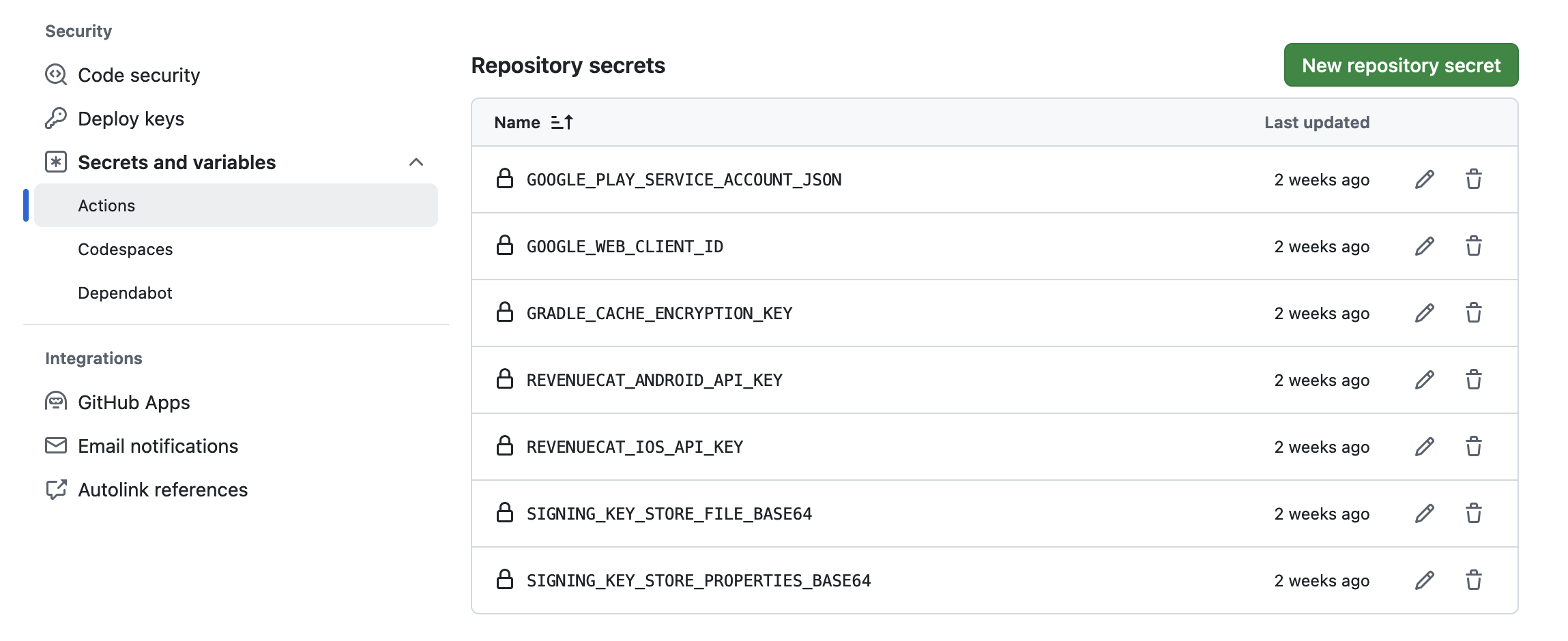
When you add all the required GitHub secrets, your settings should look something like this: